
Ticketfly builds concert app from the ashes of its WillCall acquisition


WillCall had great design and community, but didn’t have tickets to the best concerts.Ticketfly had deep relationships with music venues, but no one was using it to discover shows. Today, Ticketfly’s acquisition of WillCall comes full circle.
The parent company is using what it learned about style and recommendations to launch its own native iOS concert discovery app. Meanwhile, Ticketfly will sunset WillCall, which let users browse and buy tickets to a curated set of shows in SF, NYC, or LA.

07-Combination
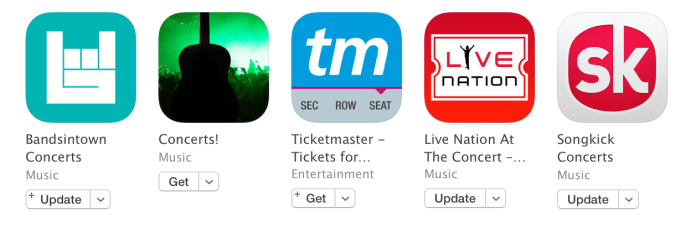
The question is whether people will find Ticketfly’s app valuable given that it’s an incomplete list of nearby concerts. Unlike ticketing service-agnostic discovery apps like Songkick or BandsInTown, Ticketfly only highlights shows it sells tickets for directly. If a concert is sold through TicketMaster, EventBrite, or another service, it won’t show up in Ticketfly’s app.
WillCall co-founder turned Ticketfly general manager Donnie Dinch says in the future the app could show inventory from other ticketers. But for now he admits the deficiency, saying “people will primarily use this as a way to access their tickets for shows they’ve purchased through Ticketfly.”

one-tap-purchase
But Ticketfly did build in one of WillCall’s best features: curation. Oftentimes you won’t know the music of every artists playing in your city each night. Thankfully, Ticketfly’s community team will hand-pick featured shows you won’t want to miss. Ticketfly’s app also lets you search through its 90,000 shows per year, and store billing information for rapid two-tap payment. Users can pull up the digital copies of their tickets on the app when they get to the venue door.

0d956d0
WillCall co-founder and Ticketfly GM Donnie Dinch
Ticketfly is also co-opting one of the most beloved features of its comprehensive concert discovery competitors. You’ll be able to set up notifications for your favorite artists to find out when their tickets go on sale so you can score some even if they sell out in seconds.
But perhaps the biggest opportunity here is how Ticketfly’s new native app could interact with Pandora, which acquired the ticketing service for $450 million late last year. See, Pandora has a money problem. After paying out streaming music royalties, it doesn’t get to keep much to cover its costs. Meanwhile, its audio ads are only effective if they’re selling something music lovers want.
Screen Shot 2016-03-16 at 8.02.44 AM
That’s why it acquired Ticketfly. If Pandora could promote Ticketfly concerts via audo ads played to users listening to those artists, it could earn a lot more revenue. And now with a native app, switching users from Pandora to Ticketfly will be much simpler than delivering them to a mobile website.
Between Ticketfly, WillCall, the corpse of Rdio it acquired, Next Big Sound analytics, and its own radio app, Pandora has plenty of music assets. The challenge will be making them all play in harmony.

Comments

Popular posts from this blog

Five budget-friendly open source storage servers

Storage is essential for the enterprise: Data must be stored. Data must be retrieved. Data must be shared. Data must be secured. At the same time, storage must not consume the entirety of your IT budget. Fortunately, you can find effective solutions in the world of open source. Outside of cost effectiveness, one of the biggest benefits of these solutions is the ability to modify them to perfectly fit your needs. You can make minor changes or even roll your own storage solution based on one of these tools. If you want enterprise support and a "solution in a can" that will meet just about any enterprise storage need, you should turn to Red Hat or SUSE. Both Linux-based companies offer some of the most powerful enterprise-ready tools on the market. But if you'd rather get your hands dirty and craft something of your own—something that won't demolish your budget—these five open source tools are a great place to start. 1: ownCloud ownCloud ( Figure ...

Facebook Now Supports PGP To Send You Encrypted Emails

You can now instruct Facebook to encrypt every email it sends to you so nobody — not even the NSA — is likely to be able to read your messages anytime soon. All you have to do is import your public PGP key into your Facebook settings and you’re good to go. The problem here, of course, is that most people have no idea how public/private key email encryption works and how to even get started with it. In the wake of Edward Snowden’s leaks, a number of organizations, including Google, promised to completely hide the complexities of end-to-end email encryption from regular users. Very few of these products have materialized so far, however — not for lack of trying, but because this is actually a very complex problem, both from a technical and user experience perspective. Facebook uses the well-established PGP scheme (the GNU Privacy Guard implementation of  OpenPGP, to be precise) to encrypt messages and tools lik...

Microsoft allays privacy concerns of Windows 10 users

Microsoft attempts to put all rumours related to Windows 10 privacy concern to rest GettyImages Allaying concerns of Windows 10 users over privacy, Microsoft has said information is collected only to offer a better OS experience. Besides, it provides users the ability to have control over the information collected. Microsoft asserts that Windows 10 is based on these two major principles. Besides, the data collected from every system is encrypted to the company's servers and remains in secure facilities. The company says information such as device ID, device type and application crash data is collected in order to help the user obtain an even more secure OS experience. Microsoft clarifies that the data does not include the user's personal files or content. Another reason that Microsoft collects data is to offer a better personalised windows experience. This includes updates on game scores, app recommendations and the common words one types in messaging. If users are ...

Use Cortana to define words for you in Windows 10

Microsoft’s Cortana has many uses including sending emails or checking the weather. One of the best uses though is a simple look-up feature for words and their definitions. Combined with the Hey Cortana voice recognition using Cortana to tell you quickly what a word means is a great hands-free tip. There are multiple ways to get Cortana to define a word. If you have Hey Cortana enabled you can simply blurt out your request: “Hey Cortana what is the meaning/definition of  inchoate ?” “Hey Cortana define  ubiquitously “ You can, of course, also just type in your request e.g “ define beatitude ” although this admittedly takes some of the speed (and fun) out of using the personal digital assistant. For many words, Cortana displays the definition within a card, and OxfordDictionaries or EncartaDictionaries powers it. Sometimes, if Cortana misunderstands you or does not have the definition, the assistant opens up a web page after performing a web search for...