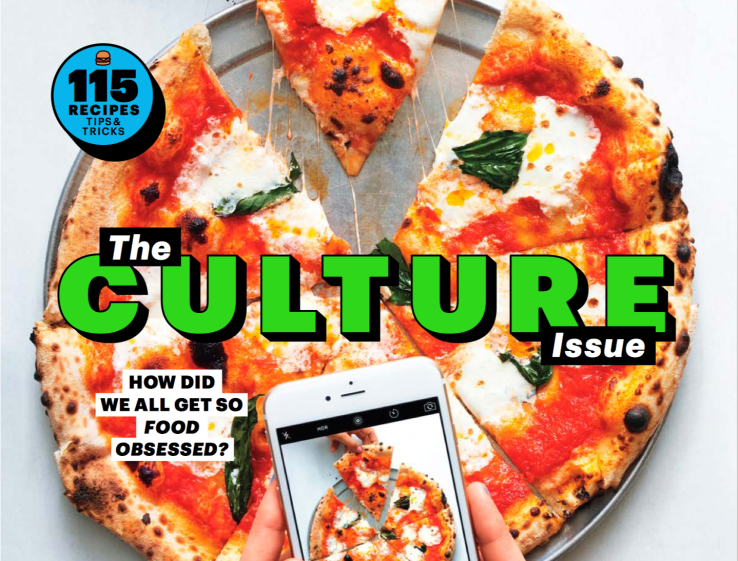
The iPhone Camera As A Professional Tool


Foodie magazine Bon Appétit has done something quite risky with this month’s issue. Photographers have left their cameras at their desks and used iPhones to shoot all the photos for the 43-page feature story of the magazine. This wasn’t Apple’s idea — Bon Appétit was working on a Culture issue, and the iPhone is part of the food culture now.
“When we were discussing what the cover for the issue should be, we realized that nothing captures the zeitgeist of food culture like someone snapping a photo of their meal with their phone,” Bon Appétit Editor-in-Chief Adam Rapoport told me. “It’s what we all do — all of us. And so we then thought, ‘Wait a minute — what if we actually shot the entire feature well with iPhones?’ And I guess you could say that’s just how we think. As editors, attempting something new and different is what keeps our jobs interesting.”
If it sounds like a gimmick, Cait Oppermann had a different reaction. “I was really excited about it, because despite being a photographer as my job, the camera I use most in my everyday life is actually my iPhone,” she said. “In some ways, it’s the camera I’m most comfortable with. But I actually felt kind of weird doing it professionally.”
And this is key to understanding what’s happening to professional photography right now. Some industries, like fashion and food, have been heavily influenced by mobile phone cameras and Instagram. If you want to spot the most interesting trends in food and fashion, you browse Instagram — and eventually, you post your own photos on Instagram.
That’s why it makes sense that a food magazine would try working with iPhones as everyone on staff is already using their phones so much. “If you love food, and eat well, and are willing to take the time, you can snap beautiful shots of food. And it’s in those images how we now share our love for food. Even professional photographers.” Rapoport said. “All of our main photographers are active on Instagram. But what’s interesting is that it’s a different medium than the printed page — so how they approach it is different than how they treat jobs for magazines like Bon Appétit.”
And the feature looks fantastic. At first, I wasn’t sure I was looking at the right photos as you would think they were shot with a DSLR camera. And yet, they were iPhone photos.
There are a few things worth noting. I would have done a terrible job compared to Bon Appétit’s photographers. It proves that the iPhone is a great creativity tool as it provides a lot of depth for professional photographers.
Photographers still used their computers to edit the shots. And the iPhone is a constrained tool as you can’t change the lens or tether the iPhone to a computer to instantly see the photos on a big screen. But you can do a lot with an iPhone.
Back in December, 60 Minutes unveiled that 800 people are working on the iPhone camera at Apple. Apple is dedicating a lot of resources on its camera as it thinks it could be an important differentiating factor with other phone manufactures and even previous iPhone models.
The company wants to push the boundaries of what you can shoot with a phone. And we’re going to hear stories about professional photographers leaving their DSLR at home more and more often.

Comments

Popular posts from this blog

How Education Will Be Smarter, Less Intrusive, And Able To Respond To How You Feel

Impatience characterizes the technology sector’s approach to education. Disruption is taking place in all other sectors of society — so, why not education? I know too well, whether at Pearson or in the classroom, the challenges and frustration of developing and using digital tools that improve outcomes for students. But I’m optimistic. We are on the verge of a tide of smarter innovation that, if allowed to spread, will turbocharge the learning experience for students. Here are four areas worth watching: 1. Using technology to learn from learners Every great digital product constantly evolves by learning from its users, adding capabilities, and improving its performance. If it’s true for your Facebook feed, then why not education? The potential is there, as the OECD’s recent report on  Students, Computers and Learning  (OECD) incidentally showed how clickstream and tracking navigation in digital readers can be used to see how students process online text and...

Top 20 WordPress Interview Questions and Answers

Top 40 WordPress Interview Questions and Answers  for freshers and experienced are below are below : 1. What is WordPress? WordPress is an online, open source website creation tool written in PHP. But in non-geek speak, it's probably the easiest and most powerful blogging and website content management system (or CMS) in existence today. 2. Different between WordPress.com vs WordPress.org? WordPress.com (fully hosted) Focus on your beautiful content, and let us handle the rest. WordPress.org (self-hosted) Get your hands dirty, and host your website yourself. refer official URL: https://en.support.wordpress.com/com-vs-org/ for more details. 3. Use of WordPress? WordPress is a free and open-source blogging tool and a content management system (CMS) based on PHP and MySQL. Features include a plugin architecture and a template system. WordPress was used by more than 23.3% of the top 10 million websites as of January 2015 4. feature of WordPress? Here are some of the featu...

The Eight Most Impactful Excel Shortcuts That You Should Master

If you’ve ever gone online to research improving your Excel skills, you’ve undoubtedly come across a post or two listing all of Excel’s keyboard shortcuts.  In the latest version of Excel, Microsoft has made it easier than ever to learn shortcuts, by assigning shortcuts to nearly every function and making the discovery of the input sequence very transparent. While memorizing Excel shortcuts will generally improve your productivity, not all shortcuts are created equal.  Shortcuts that you never use are not inherently not very useful and not worth memorizing.  Your focus should be on the shortcuts that have the most impact – either by the amount of time it saves you, the frequency that you’ll use them, or the behavior it encourages. If you’ve already started using Excel or just haven’t utilized shortcuts heavily before, review the top eight shortcuts below.  For any that you don’t know already, I would suggest memorizing them and incorp...

Google Announces Android Wear Update With WiFi Support, Always-On Apps, And More

It has been a while since Android Wear got any substantial updates, but today Google is announcing a big one. A new version of Wear will be rolling out over the coming weeks that includes a number of previously rumored features (like WiFi support) and some all new stuff (like always-on apps). Most Wear devices use the always-on ambient mode for the watch face by default, the Moto 360 being a notable exception. The new Android Wear version allows apps to operate in ambient mode too, so they remain active when the watch goes to sleep. That makes it easier to take a quick glance at the app instead of waking the device up and opening the app all over again. The watch will still only go into full-color mode when necessary. WiFi support is also coming in the update, which means your watch can be useful even if your phone isn't connected. Watches with WiFi support will be able to connect to WiFi and still get messages and notifications from your phone, provided it has an interne...

IT Where

#Responsive_Webdesign  start from #7500, #hosting_Service  Start from #3300 Per Year #get   #your   #special  offers at  Itwhere Pondy #Digital_Marketing  , #SEO , #Product_Branding  at Itwhere Pondy Email:info@itwheretech.co. in M:+91 9092734853 www.itwheretech.co.in