
StatMuse Picks Up $10M For Its AI-Based, Graphic Search Engine For Sports Statistics


The business of sport revolves around stats — from those who use them to improve performance, through to those who look at them for fun, or for more financial ends. Now a startup that helps make it easier for regular people to dig into and visualise sports stats has picked up some funding to grow. StatMuse, a startup out of San Francisco that currently lets you search for basketball facts and statistics through ordinary “natural” language requests, has picked up a $10 million round of funding.
The Series A comes from the Walt Disney Company and TechStars (StatMuse was in a 2015 cohort in the Disney/TechStars Accelerator), along with Allen & Company, Greycroft Partners, Promus Ventures, Haas Portman, Deep Fork Capital, and Bee Partners. The round also included some notable names from the sports world: former NBA commissioner David Stern and United Talent Agency also chipped in.
The Disney involvement is strategic: after launching its public beta in the autumn of 2015, StatMuse signed a content deal with Disney-owned ESPN to provide statistical content during the 2015-16 NBA season.
StatMuse — which continues to be in beta — says it will use the funding to extend its search engine into other sports beyond basketball.
The idea behind StatMuse is not an uncommon one: there are very powerful search algorithms in the market today, but many of the most advanced to call up statistics and other analytics have been created in language more suited for data scientists, making them inaccessible to regular Joes.
At the same time, there have been a number of innovations around big data, machine learning and natural language processing that are giving more analytics power to non-technical users, be they marketers or others in the business who could benefit from directly making their own analytical queries.
StatMuse’s founders Eli Dawson (CEO) and Adam Elmore (CTO) — childhood friends who co-captained their high school basketball team — saw that there was an opportunity to apply that principle to the world of sports statistics to tap into the general appetite not only to look up facts, but to view them in a graphic, engaging way.
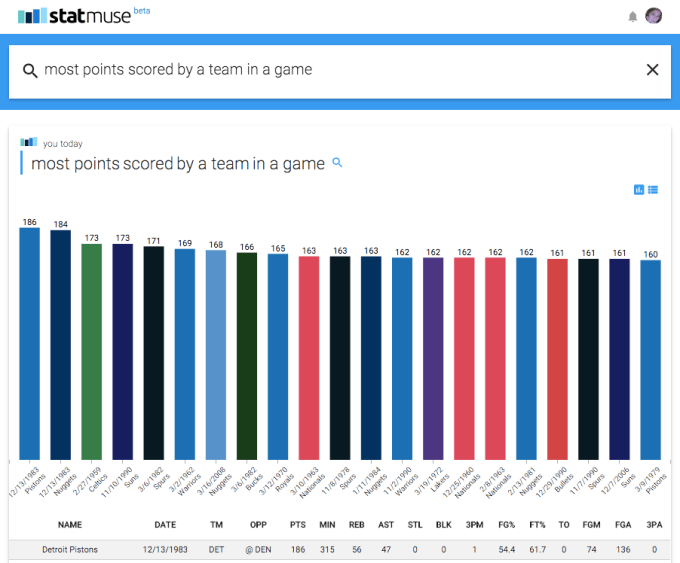
statmuse
“We built a product for fellow sports fans interested in statistics and visual media. StatMuse is our vision for a highly engaging media platform that fuels sports discussion anywhere in the world,” Dawson said in a statement.
Today you can go on to StatMuse’s site to look up all kinds of basketball stats, where the range of queries is very open-ended. I looked up “players named Larry,” who I could then order by their various other stats like points scored or minutes played.
You can then share the information to Facebook or Twitter, or to a StatMuse-only social network: you can also follow and be followed by people on the site itself, laying the groundwork for a potential community of other sports nerds using whatever other features StatMuse launches next.
The service reminds me a bit of others like Graphiq, which also lets you look up trends and information and then visualise it. But while Graphiq today seems mainly interested in a B2B play, courting publishers as users (disclaimer: TC/AOL are among them), StatMuse is potentially developing both the B2B (per its deal with Disney/ESPN) and and consumer angle, focusing specifically on the opportunity to provide better stats for sports.
Today, there isn’t really much of a narrative to be gleaned from the stats apart from what you see when your search results have been returned to you, but the longer term idea seems to develop products that will give those stats even more context — or at least work with partners, like ESPN, that will provide that context alongside the bare numbers.
“Sports is, by itself, the international language, but StatMuse has taken a giant leap forward, transforming sports statistics into meaningful, storytelling prose,” said David Stern in a statement.
As a pure content play, it’s unsurprising to see Disney taking an interest in the startup.
Disney is an old media company built around TV and movies, but it is fully 

Comments

Popular posts from this blog

What is your preferred smartphone screen size

Screen envy. We all have it. Or do we? See, that’s the thing, I’m just not so sure. One thing I am sure about is that our phone screens have gotten progressively bigger and bigger over the last few years. The funny thing is, we as a society have taken that ball and run with it, like we just don’t care. But I always thought we did care? Some time ago, when phones were in the sub-5” range, we used to have a term called “phablet” which described an almost absurdly big phone. The definition varied from person to person. I always considered a phone with a screen 5.5” or bigger to be a phablet. The Galaxy Note fell into that category. The Lumia 1520 certainly did. There are others as well. I was safely ensconced in the 4.5” area at the time with my Lumia 920. What did I know? Leon’s getting laaaaaaaarrrger But slowly, phones started topping the 5” mark. I’m not talking about phablets here, I’m talking about normal flagship phones – the Galaxy S4 (barely) and the HTC One (M7) are ...

Facebook Now Supports PGP To Send You Encrypted Emails

You can now instruct Facebook to encrypt every email it sends to you so nobody — not even the NSA — is likely to be able to read your messages anytime soon. All you have to do is import your public PGP key into your Facebook settings and you’re good to go. The problem here, of course, is that most people have no idea how public/private key email encryption works and how to even get started with it. In the wake of Edward Snowden’s leaks, a number of organizations, including Google, promised to completely hide the complexities of end-to-end email encryption from regular users. Very few of these products have materialized so far, however — not for lack of trying, but because this is actually a very complex problem, both from a technical and user experience perspective. Facebook uses the well-established PGP scheme (the GNU Privacy Guard implementation of  OpenPGP, to be precise) to encrypt messages and tools lik...

How to prevent Recent and Phone Favorite contacts from showing in your iOS task switcher

When you double-click your iPhone's home button, you will be greeted with the task switching screen, which presents you with card deck-style snapshots of your active apps to freely browse and switch to. With iOS 8, however, where most iPhones are at the moment, Apple introduced a Favorites row there, with circular pictures of your most recently used contacts. Most people aren't bothered by their recent contacts appearing there, but for some this means easy snooping on who they've called or texted last, or simply unnecessary clutter. If you don't want to wait until  iOS 9  hits and gets rid of these circular shenanigans in your task switcher, here's what you need to do to get rid of them: 1. Go to the Settings app, and scroll down to the Mail, Contacts, Calendars section; 2. From Mail, Contacts, Calendars, look for the Contacts section, which will be hosting the Show in App Switcher options; 3. Tap on Show in App Switche...

Intel announces the first 14 nanometre processor

At the Computex conference in Taipei, chipmaker Intel has revealed a fanless mobile PC reference design using the first of its next-generation 14nm "Broadwell" processors. The 2 in 1 pictured here is a 12.5" screen that is just 7.2 mm thick with keyboard detached and weighs 670 grams.  The Surface Pro 3  – for comparison – is 9.1 mm thick and weighs 800 grams. It includes a media dock that provides additional cooling for a burst of performance. The next-generation chip is purpose-built for 2 in 1s and will hit the market later in  2014 . Called the Intel Core M, it will be the most energy-efficient Intel Core processor in the company's history with power usage cut by up to 45 percent, resulting in 60 percent less heat. The majority of designs based on this new chip are expected to be fanless, with up to  32 hours of battery life,  offering both a lightning-fast tablet and razor-thin laptop. Intel is also delivering innovation and performance for the ...

How to Choose BitLocker Drive Encryption Method and Cipher Strength in Windows 10?

BitLocker is an encryption method that enables users to lock the different drives in  Windows . The drives which are protected by BitLocker are accessed by passwords. Windows has provided opportunity for users to choose and configure the  cipher  strength and algorithm used by BitLocker Drive Encryption. This can be achieved via the Local Group Policy editor. The Local Policy Editor will let you configure and select the cipher method for BitLocker encryption. By default it is not configured but you can choose your choiceable encryption method by enabling the Policy Setting. If the drive is already encrypted or if encryption is in progress, the encyption method will have no effect. If you leave the policy unconfigured, then BitLocker will use the default encryption method of AES 128-bit with Diffuser or the encryption method specified by the setup script. Steps to Choose BitLocker Drive Encryption Method and Cipher Strength in Windows 10 1.  ...