
NASA Rover Designed To Last 90 Days Celebrates 12 Year Anniversary


This week NASA’s Mars Opportunity rover celebrated its 12 year anniversary on the red planet. What’s truly remarkable about this is the fact that the rover was only designed to operate for about 90 days.
Due to helpful unforeseen surface conditions and few creative software changes, NASA has been able to keep Opportunity alive and operational to this day.
After a six-and-a-half month journey from Earth, Opportunity entered the Martian atmosphere and used a parachute, retrorockets, and a cocoon of airbags to land safely on the surface back in January of 2004.

One of the reasons NASA believed the rover would only function properly for 90 Martian days was because of the extreme level of dust on Mars. This dust was predicted to build up on Opportunity’s solar panels and eventually, the rover would be unable to receive power.
Receiving solar power on Mars, which is 50 percent farther away from the Sun than Earth, was a known challenge even without the dust. NASA designed Opportunity’s solar panels to be as wide as possible in order to collect as much sunlight as it could. Even so, the lifetime of Opportunity was measured in days, perhaps months, but certainly not years.
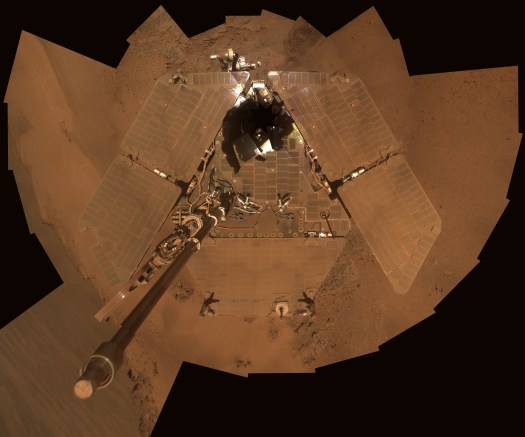
IDL TIFF file
Opportunity’s solar panels covered in Martian dust / Image courtesy of NASA
Luckily, a surprising thing happened: every once in a while, whirling columns of air, or “dust devils,” swept over the rover and cleaned off the coating of dust from the solar panels.
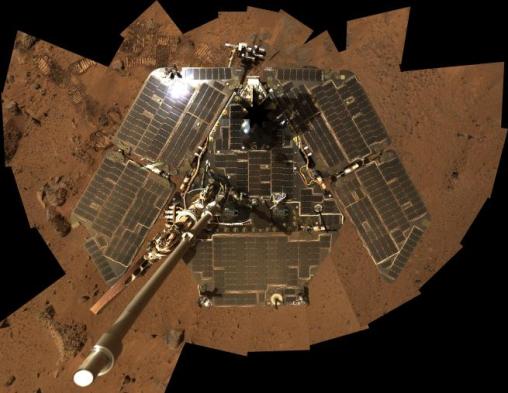
opportunity rover without dust
Opportunity rover after a dust devil cleaning / Image courtesy of NASA
This was a godsend to Opportunity and the NASA team who operated it. Dust build up would continue to be a challenge, but Martian dust devils have helped keep the rover’s lights on.
Collecting sufficient solar power wasn’t the only problem Mars threw NASA’s way. In its first year, Opportunity found itself slightly buried in a sand dune. Engineers and scientists at NASA’s Jet Propulsion Laboratory recreated the scenario with an Opportunity mock-up and identified a sequence of wheel rotations that would ultimately set the rover free.
In addition to hardware issues, Opportunity’s software has required a few upgrades over the years. NASA had to perform remote software updates to improve the rover’s visual detection, photography, and hazard detection capabilities.
Sending a rover all the way to Mars is expensive. It’s a fraction of the price of sending a human there, but it still cost NASA $400 million to build Opportunity and get it on the surface. Squeezing more science out of that expensive rover helps enable NASA to justify the time and money it took to get it there.
The fact that NASA has kept the rover operational for 12 years is a feat of engineering and ingenuity, but not everyone agrees that NASA should keep it running. It costs about $14 million per year to operate Opportunity and it’s just not as capable as it once was.
Two of Opportunity’s scientific instruments no longer work, its joints occasionally lock up, and it experiences periods of amnesia due to problems with its flash memory.
Even so, the rover continues to accomplish useful scientific work. In recent years, researchers used Opportunity to examine a series of large craters in order to get a look at older layers of Mars’ history.
The rover has also been one of the keys to understanding the role of liquid water in the planet’s past, which will help scientists learn if life ever existed there. Impressively, Opportunity has achieved the record of traveling the longest distance on another planet and continues to send back never before seen images of Mars.
While it may be a fixer-upper after spending over a decade in harsh Martian conditions, it remains a crucial asset to NASA as well as our understanding of Mars. After 12 years, Opportunity pushes onward.

Comments

Popular posts from this blog

Facebook Now Supports PGP To Send You Encrypted Emails

You can now instruct Facebook to encrypt every email it sends to you so nobody — not even the NSA — is likely to be able to read your messages anytime soon. All you have to do is import your public PGP key into your Facebook settings and you’re good to go. The problem here, of course, is that most people have no idea how public/private key email encryption works and how to even get started with it. In the wake of Edward Snowden’s leaks, a number of organizations, including Google, promised to completely hide the complexities of end-to-end email encryption from regular users. Very few of these products have materialized so far, however — not for lack of trying, but because this is actually a very complex problem, both from a technical and user experience perspective. Facebook uses the well-established PGP scheme (the GNU Privacy Guard implementation of  OpenPGP, to be precise) to encrypt messages and tools lik...

Laser gun is deployed and operational on U.S. Navy warship

After several years of research and testing, the U.S. Navy has introduced a new laser gun designed to protect ships without using ammunition.   Another entry on our  timeline  is now a reality as the U.S. Navy has authorised the first operational use of a laser weapon. This new hi-tech system – known as the Laser Weapon System (LaWS) – is designed to serve as a form of defence against drones and other small flying vehicles or small-boat enemies including suicide attackers. It is highly accurate, able to hit objects moving at up to 300 mph (480 km/h). The LaWS fires a solid-state infrared beam with two modes: high output to destroy a target, and low output for optical "dazzling", warning shots or to cripple a potential attacker. Among the advantages of this device versus projectile weapons is the low cost per shot, as each firing of the weapon requires only minimal cost for generating the energetic pulse; by contrast ordnance for projectile weapons must be des...

Intel announces the first 14 nanometre processor

At the Computex conference in Taipei, chipmaker Intel has revealed a fanless mobile PC reference design using the first of its next-generation 14nm "Broadwell" processors. The 2 in 1 pictured here is a 12.5" screen that is just 7.2 mm thick with keyboard detached and weighs 670 grams.  The Surface Pro 3  – for comparison – is 9.1 mm thick and weighs 800 grams. It includes a media dock that provides additional cooling for a burst of performance. The next-generation chip is purpose-built for 2 in 1s and will hit the market later in  2014 . Called the Intel Core M, it will be the most energy-efficient Intel Core processor in the company's history with power usage cut by up to 45 percent, resulting in 60 percent less heat. The majority of designs based on this new chip are expected to be fanless, with up to  32 hours of battery life,  offering both a lightning-fast tablet and razor-thin laptop. Intel is also delivering innovation and performance for the ...

How to Choose BitLocker Drive Encryption Method and Cipher Strength in Windows 10?

BitLocker is an encryption method that enables users to lock the different drives in  Windows . The drives which are protected by BitLocker are accessed by passwords. Windows has provided opportunity for users to choose and configure the  cipher  strength and algorithm used by BitLocker Drive Encryption. This can be achieved via the Local Group Policy editor. The Local Policy Editor will let you configure and select the cipher method for BitLocker encryption. By default it is not configured but you can choose your choiceable encryption method by enabling the Policy Setting. If the drive is already encrypted or if encryption is in progress, the encyption method will have no effect. If you leave the policy unconfigured, then BitLocker will use the default encryption method of AES 128-bit with Diffuser or the encryption method specified by the setup script. Steps to Choose BitLocker Drive Encryption Method and Cipher Strength in Windows 10 1.  ...

How to prevent Recent and Phone Favorite contacts from showing in your iOS task switcher

When you double-click your iPhone's home button, you will be greeted with the task switching screen, which presents you with card deck-style snapshots of your active apps to freely browse and switch to. With iOS 8, however, where most iPhones are at the moment, Apple introduced a Favorites row there, with circular pictures of your most recently used contacts. Most people aren't bothered by their recent contacts appearing there, but for some this means easy snooping on who they've called or texted last, or simply unnecessary clutter. If you don't want to wait until  iOS 9  hits and gets rid of these circular shenanigans in your task switcher, here's what you need to do to get rid of them: 1. Go to the Settings app, and scroll down to the Mail, Contacts, Calendars section; 2. From Mail, Contacts, Calendars, look for the Contacts section, which will be hosting the Show in App Switcher options; 3. Tap on Show in App Switche...