
Google Hangouts Gets Its Own Site, Just Like Facebook Messenger


Everyone wants to be free and standalone. Remember when Facebook Messenger got its own site that maybe people use but we’re not sure because they don’t talk about it?
Google Hangouts wanted some of that action, too. Starting today you can go to http://hangouts.google.com to make a phone call or ping a friend:
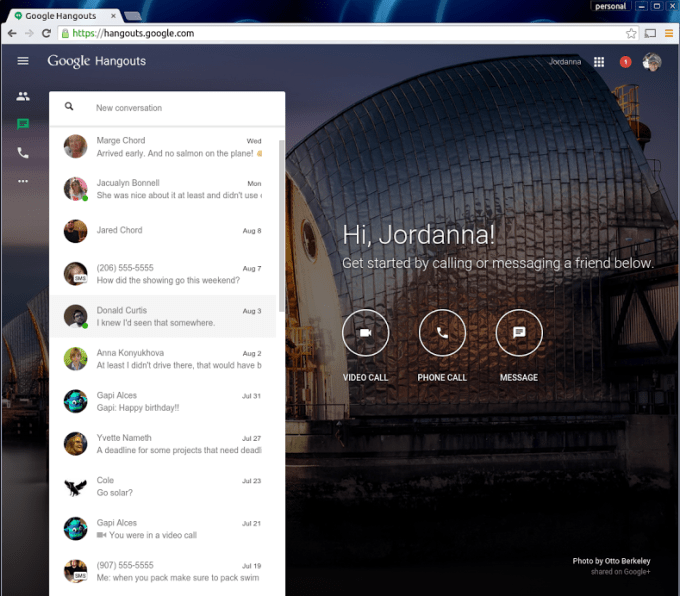
startPageLaunch
Interestingly enough, the product hasn’t broken away from the Google domain yet. It doesn’t even own Hangouts.com. Domain names aren’t a strong suit of Google.
Yes, this is also part of the breaking away that Google+ services are going through, joining the Photos product in all of its “standalone” glory. I use Hangouts in Gmail on the desktop, but I might switch over. Having a big old call button is actually kind of handy.
This is also, of course, a massive branding exercise for Google. It wants to build powerful brands to compete with other micro-products coming out of Facebook, Microsoft and Snapchat. Google has Photos and Hangouts, Facebook has Instagram and Messenger and Snapchat is coming on strong with Stories.

Comments

Popular posts from this blog

What is your preferred smartphone screen size

Screen envy. We all have it. Or do we? See, that’s the thing, I’m just not so sure. One thing I am sure about is that our phone screens have gotten progressively bigger and bigger over the last few years. The funny thing is, we as a society have taken that ball and run with it, like we just don’t care. But I always thought we did care? Some time ago, when phones were in the sub-5” range, we used to have a term called “phablet” which described an almost absurdly big phone. The definition varied from person to person. I always considered a phone with a screen 5.5” or bigger to be a phablet. The Galaxy Note fell into that category. The Lumia 1520 certainly did. There are others as well. I was safely ensconced in the 4.5” area at the time with my Lumia 920. What did I know? Leon’s getting laaaaaaaarrrger But slowly, phones started topping the 5” mark. I’m not talking about phablets here, I’m talking about normal flagship phones – the Galaxy S4 (barely) and the HTC One (M7) are ...

Facebook Now Supports PGP To Send You Encrypted Emails

You can now instruct Facebook to encrypt every email it sends to you so nobody — not even the NSA — is likely to be able to read your messages anytime soon. All you have to do is import your public PGP key into your Facebook settings and you’re good to go. The problem here, of course, is that most people have no idea how public/private key email encryption works and how to even get started with it. In the wake of Edward Snowden’s leaks, a number of organizations, including Google, promised to completely hide the complexities of end-to-end email encryption from regular users. Very few of these products have materialized so far, however — not for lack of trying, but because this is actually a very complex problem, both from a technical and user experience perspective. Facebook uses the well-established PGP scheme (the GNU Privacy Guard implementation of  OpenPGP, to be precise) to encrypt messages and tools lik...

Best Web Design Company in Pondicherry

#Technology    has two faces. We all feel it, but sometimes can’t find words to describe it.  #Ebooks    are the best example to show the 0-1 nature of emotions the  #technology  evokes. #itwhere    provide a  #Best     #solutions    to  #Growyourbusiness    feel free to drop a  #Mail    info@itwheretech.co.in www.itwheretech.co.in 

How to prevent Recent and Phone Favorite contacts from showing in your iOS task switcher

When you double-click your iPhone's home button, you will be greeted with the task switching screen, which presents you with card deck-style snapshots of your active apps to freely browse and switch to. With iOS 8, however, where most iPhones are at the moment, Apple introduced a Favorites row there, with circular pictures of your most recently used contacts. Most people aren't bothered by their recent contacts appearing there, but for some this means easy snooping on who they've called or texted last, or simply unnecessary clutter. If you don't want to wait until  iOS 9  hits and gets rid of these circular shenanigans in your task switcher, here's what you need to do to get rid of them: 1. Go to the Settings app, and scroll down to the Mail, Contacts, Calendars section; 2. From Mail, Contacts, Calendars, look for the Contacts section, which will be hosting the Show in App Switcher options; 3. Tap on Show in App Switche...

How to Choose BitLocker Drive Encryption Method and Cipher Strength in Windows 10?

BitLocker is an encryption method that enables users to lock the different drives in  Windows . The drives which are protected by BitLocker are accessed by passwords. Windows has provided opportunity for users to choose and configure the  cipher  strength and algorithm used by BitLocker Drive Encryption. This can be achieved via the Local Group Policy editor. The Local Policy Editor will let you configure and select the cipher method for BitLocker encryption. By default it is not configured but you can choose your choiceable encryption method by enabling the Policy Setting. If the drive is already encrypted or if encryption is in progress, the encyption method will have no effect. If you leave the policy unconfigured, then BitLocker will use the default encryption method of AES 128-bit with Diffuser or the encryption method specified by the setup script. Steps to Choose BitLocker Drive Encryption Method and Cipher Strength in Windows 10 1.  ...