Consumers Spend 85% Of Time On Smartphones In Apps, But Only 5 Apps See Heavy Use


New research on mobile behavior released today points to the growing struggle that app businesses face in establishing themselves as a must-have download on users’ smartphones. Today’s consumers are spending over 85 percent of their time on their smartphones using native applications, but the majority of their time – 84 percent – is spent using just five non-native apps they’ve installed from the App Store.
Those five apps will vary from person to person. For some, their top five could include social media or gaming, while others may spend more time in instant messaging.
This data further supports a study Nielsen released earlier this month which also reiterated that there does appear to be an upper limit to how many apps consumers use on a monthly basis. While this new study from Forrester Research examines where consumers spent the majority of their time, Nielsen’s report noted that users would only use 26 to 27 apps per month in total.
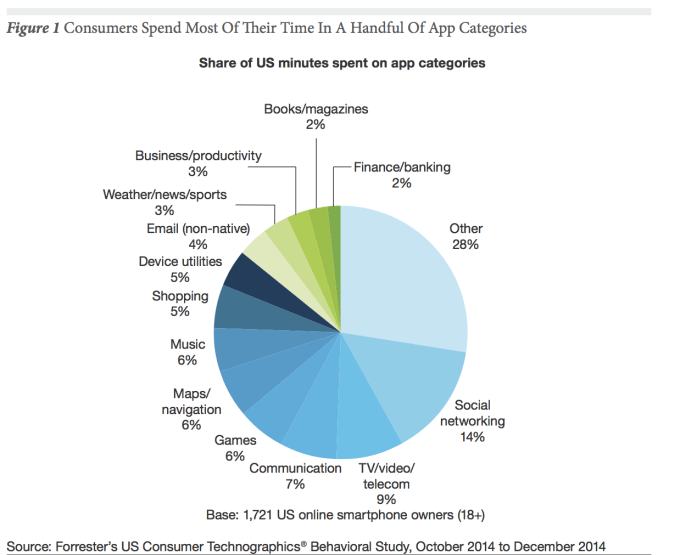
The new data on app usage comes from a Forrester Research study that analyzed 2,000 U.S. smartphone owners to better determine how users engage with the apps they have on their phones. According to the findings, communication and social apps account for the most usage – with a combined 21 percent of all smartphone minutes. Text messaging and voice calls were not counted, but would add to this total if they had been.
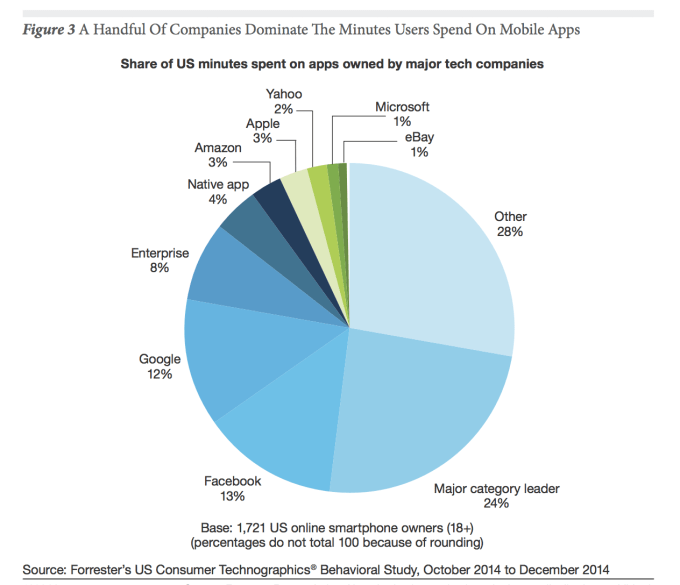
This trend also means that a small handful of companies are now dominating app usage. Facebook, for example, accounts for 13 percent of U.S. minutes spent on apps, followed closely by Google at 12 percent. Other big-name tech companies also see heavy usage, including Amazon (3 percent), Apple (3 percent), Yahoo (2 percent), Microsoft (1 percent) and eBay (1 percent.)
As a category, social networks claim 14 percent of all smartphone usage – or more than 25 minutes per day. Facebook is the leader here, with 1.25 billion mobile monthly active users.
Screen Shot 2015-06-22 at 12.06.29 PM

[Note on the above chart: the large grouping referred to as “major category leader” includes the other leading apps that do not fall within the 6 companies evaluated for the research, such as Twitter, Firefox, The Weather Channel, etc.]
Meanwhile, U.S. users spend 4.8 percent of their smartphone minutes in instant messaging apps like WhatsApp, but globally, this figure is even higher. Worldwide, apps like WeChat, KakaoTalk, Line and others are seeing users spending 50 to 200 minutes with them per week. In the U.S., however, the phone’s native messaging application sees higher usage than IM’ing apps, accounting for 8 percent of minutes spent on smartphones.
Media is another popular category of apps with weather, news and sports accounting for 3 percent of all usage minutes. News leads here with a median of 11 minutes, 51 seconds per day. Mobile users’ interest and heavy use of news apps is likely why Apple decided to enter the space itself with the launch of the forthcoming “News” app which will be installed by default with iOS 9.
Screen Shot 2015-06-22 at 12.06.13 PM
Games and Music account for 6 percent of smartphone usage minutes, while streaming video represents 9 percent of minutes. Here, YouTube leads with 43 percent adoption, but Netflix has the highest median use at 31 minutes, 33 seconds. Books and magazines represent 2 percent of smartphone usage minutes, which is actually fairly high given their long-form nature. Other categories like Shopping (5 percent), Maps/Navigation (6 percent), Email (non-native, 4 percent), Productivity (3 percent) are also popular.
Based on this data and other findings in the new report, Forrester advises businesses to design their apps only for their best and most loyal or frequent customers – because those are the only one who will bother to download, configure and use the application regularly. For instance, most retailers say their mobile web sales outweigh their app sales, the report says. Meanwhile, outside of these larger players, many customers will use mobile websites instead of a business’ native app

Comments

Popular posts from this blog

Peel Turns Your Apple Watch Into A Universal Remote Control

Does it make sense to use your Apple Watch as a remote control for your media devices? Smart remote maker  Peel  thinks so, having just launched a universal remote control application for the Apple Watch which lets you operate over 400,000 models of home electronics, including not only televisions, but also DVD players, and even audio and streaming devices, like the Roku. The Apple Watch app is actually an extension of the company’s  existing smart remote app for iPhone . And while in a few cases the new Watch app will allow you to control your devices via Wi-Fi, for the most part, it will require the  Pronto  hardware just like the iPhone version does. The Pronto 360-degree IR blaster is what turns the iPhone, and now the Apple Watch, into a smart universal remote control. A $49.99 piece of hardware about the size of a salt shaker, Pronto sits in your entertainment center to provide the IR capabilities required to operate your TV and other electroni...

Google, Microsoft, Mozilla And Others Team Up To Launch WebAssembly, A New Binary Format For The Web

Google, Microsoft, Mozilla and the engineers on the WebKit project today announced that they have teamed up to launch WebAssembly, a new binary format for compiling applications for the web. The web thrives on standards and, for better or worse, JavaScript is its programming language. Over the years, however, we’ve seen more and more efforts that allow developers to work around some of the limitations of JavaScript by building compilers that transpile code in other languages to JavaScript. Some of these projects focus on adding new features to the language (like Microsoft’s TypeScript) or speeding up JavaScript (like Mozilla’s asm.jsproject). Now, many of these projects are starting to come together in the form of WebAssmbly. The new format is meant to allow programmers to compile their code for the browser (currently the focus is on C/C++, with other languages to follow), where it is then executed inside the J...

Intel announces the first 14 nanometre processor

At the Computex conference in Taipei, chipmaker Intel has revealed a fanless mobile PC reference design using the first of its next-generation 14nm "Broadwell" processors. The 2 in 1 pictured here is a 12.5" screen that is just 7.2 mm thick with keyboard detached and weighs 670 grams.  The Surface Pro 3  – for comparison – is 9.1 mm thick and weighs 800 grams. It includes a media dock that provides additional cooling for a burst of performance. The next-generation chip is purpose-built for 2 in 1s and will hit the market later in  2014 . Called the Intel Core M, it will be the most energy-efficient Intel Core processor in the company's history with power usage cut by up to 45 percent, resulting in 60 percent less heat. The majority of designs based on this new chip are expected to be fanless, with up to  32 hours of battery life,  offering both a lightning-fast tablet and razor-thin laptop. Intel is also delivering innovation and performance for the ...

How to Install and Uninstall Graphics Tools in Windows 10?

Windows 10 has included some optional features which are in-built in the operating system but not installed by default. The Graphics Tool is one such package. The Graphic Tools are needed for users who use Visual Studio to develop DirectX apps or games. The tools have many utility like Graphics debugging, tracing Direct3D calls, inspection of parameters, analyzing Direct3D calls, experiments with shaders and many more. Visual Studio has a Graphics Frame Analysis tool that operates on graphics debugging log. It also collects all necessary information to draw Direct3D calls. The Graphics tools also consist of GPU Usage which lets you analyse and track GPU use in real time and at the same time collects and analyzes the timing data of the workloads. Steps to Install and Uninstall Graphics Tools in Windows 10? 1.  Open the Start Menu, go to  Settings  and tap on  System . 2.  Go to  Apps and features . 3.  In the right panel, tap  Manage ...

Barnes & Noble is killing itself

I’ve been chronicling the slow demise of B&N for years now, watching the company bleed out, drop by drop, until it has become a shell of its former value. B&N was a cultural center in places without cultural centers. It was a stopover on rainy days in New York, Chicago, and Cleveland and it was a place you could go to get your kids’ first books. That’s mostly over now. On Monday the company laid off 1,800 people. This offered a cost savings of $40 million. But that’s particularly interesting. That means each of those people made an average of $22,000 or so per year and minimum wage workers – hourly folks who are usually hit hardest during post-holiday downturns – would be making $15,000. In fact, what B&N did was fire all full time employees at 781 stores. From a former employee: On Monday morning, every single Barnes & Noble location told their full-time employees to pack up and leave. The eliminated positions were as follows: the head cashiers (those are the pe...