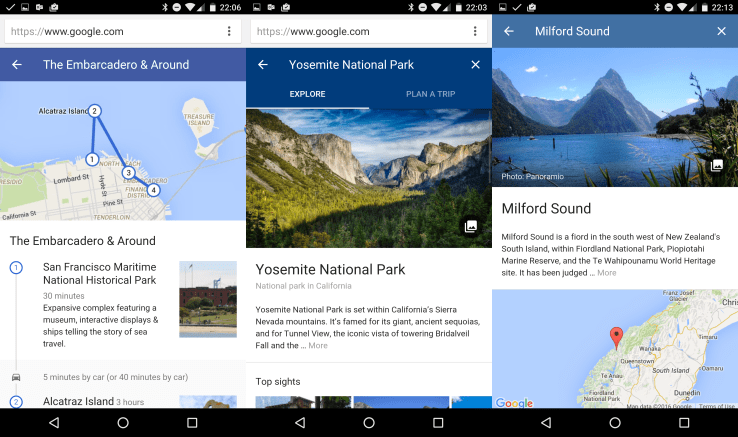
Google’s new Destinations feature lets you plan trips right from its search engine on mobile


Google is making it easier than ever to plan a trip or vacation with a new feature that lets you look up destinations, complete with flight and hotels prices, right from its search engine on a mobile phone.
“Google Destinations” is triggered by certain searches — such as “Spain surfing,” “New Zealand hiking,” or “Colorado skiing” — and can also be found when a user searches for a specific country, state, city or other destination.
The service is only available on mobile — Google explained that saying it saw a 50 percent spike in travel-related questions on mobile devices last year — but, beyond convenience, is intended to offer discovery, too. Destinations includes activity suggestions, in the form of curated itineraries, for an initial 201 cities worldwide. So, if you want to visit a new place but aren’t 100 percent what to do there, Google hopes to give you some ideas and convince you to book that ticket.
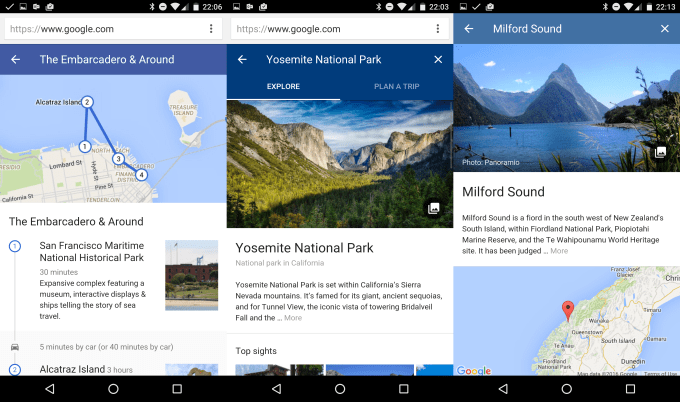
google travel 2
On the subject of bookings themselves, Google Destinations sends users to airline websites to complete their purchase, but it does offer some nifty features before that step. In addition to estimating the cost of a flight and hotel, it allows users to switch their travel dates to help show when prices are at their lowest, or the cost at a particular time of the year. There’s also an ‘Explore’ tab to give you a snapshot of the weather at each destination, an important factor when planning a trip.
Google Destinations is initially available in the U.S. and a handful of other countries. From our time using it, we found it to be quick and useful. It remains to be seen if people will pay for large ticket items spontaneously via their phone, but Google created Street View — the fantasy globe trotting service that can suck up your time like nobody’s business — and now acting on your travel urges just got a lot easier. If nothing else, Destinations is a better way to fill five minutes of downtime on the bus than Candy Crush.

Comments

Popular posts from this blog

Best Web Design Company in Pondicherry

#Technology    has two faces. We all feel it, but sometimes can’t find words to describe it.  #Ebooks    are the best example to show the 0-1 nature of emotions the  #technology  evokes. #itwhere    provide a  #Best     #solutions    to  #Growyourbusiness    feel free to drop a  #Mail    info@itwheretech.co.in www.itwheretech.co.in 

Trump cites Facebook exec’s comments downplaying Russian ad influence on election

You’d be forgiven for missing Donald Trump’s multiple retweets of Facebook executive Rob Goldman over the weekend. Perhaps you were spending time with family, watching Black Panther or just attempting to forget politics for a moment by ignoring the manic flurry of social media updates from the leader of the free world. But in amongst a deluge of tweets that blamed Democrats for failing to preserve DACA, called out the FBI over the recent school shooting in Florida on the FBI and affectionately referred to a member of congress as “Liddle’ Adam Schiff, the leakin’ monster of no control,” the President cited Facebook’s VP of Ads as evidence against claims that his campaign colluded with Russia. “The Fake News Media never fails,” Trump tweeted over the weekend. “Hard to ignore this fact from the Vice President of Facebook Ads, Rob Goldman!” Trump was citing Goldman’s own Twitter dump over the past week, responding to Special Counsel Robert Mueller’s recent indictment of 13 Russian...

Google Announces Android Wear Update With WiFi Support, Always-On Apps, And More

It has been a while since Android Wear got any substantial updates, but today Google is announcing a big one. A new version of Wear will be rolling out over the coming weeks that includes a number of previously rumored features (like WiFi support) and some all new stuff (like always-on apps). Most Wear devices use the always-on ambient mode for the watch face by default, the Moto 360 being a notable exception. The new Android Wear version allows apps to operate in ambient mode too, so they remain active when the watch goes to sleep. That makes it easier to take a quick glance at the app instead of waking the device up and opening the app all over again. The watch will still only go into full-color mode when necessary. WiFi support is also coming in the update, which means your watch can be useful even if your phone isn't connected. Watches with WiFi support will be able to connect to WiFi and still get messages and notifications from your phone, provided it has an interne...

South Korea aims for startup gold

Back in 2011, when South Korea won its longshot bid to host the 2018 Winter Olympics, the country wasn’t widely recognized as a destination for ski and snow lovers. It wasn’t considered much of a tech startup hub either. Fast forward seven years and a lot has changed. For the next 10 days, the eyes of the world will be on the snowy slopes of PyeongChang. Meanwhile, a couple of hours away in Seoul, a burgeoning startup scene is seeing investments multiply, generating exits and even creating a unicorn or two. While South Korea doesn’t get a perfect score as a startup innovation hub, it has established itself as a serious contender. More than half a billion dollars annually has gone to seed through late-stage funding rounds for the past few years. During that time, at least two companies, e-commerce company Coupang and mobile-focused content and commerce company Yello Mobile, have established multi-billion-dollar valuations. To provide a broader picture of how South Korea stacks ...

The Eight Most Impactful Excel Shortcuts That You Should Master

If you’ve ever gone online to research improving your Excel skills, you’ve undoubtedly come across a post or two listing all of Excel’s keyboard shortcuts.  In the latest version of Excel, Microsoft has made it easier than ever to learn shortcuts, by assigning shortcuts to nearly every function and making the discovery of the input sequence very transparent. While memorizing Excel shortcuts will generally improve your productivity, not all shortcuts are created equal.  Shortcuts that you never use are not inherently not very useful and not worth memorizing.  Your focus should be on the shortcuts that have the most impact – either by the amount of time it saves you, the frequency that you’ll use them, or the behavior it encourages. If you’ve already started using Excel or just haven’t utilized shortcuts heavily before, review the top eight shortcuts below.  For any that you don’t know already, I would suggest memorizing them and incorp...