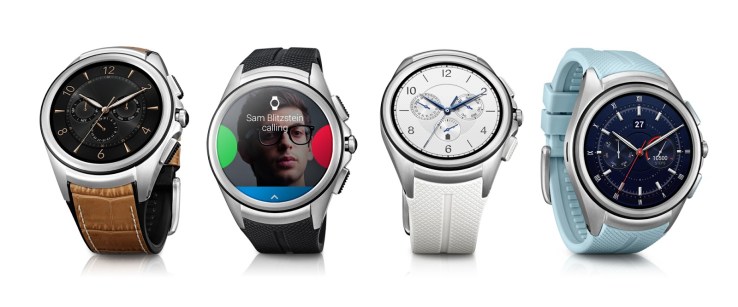
New Android Wear Smartwatches Can Go Online Without Needing Your Smartphone


Google is finally adding cellular connectivity to Android Wear, its operating software for smartwatches and wearables, in a move that could reduce a user’s dependence on their phone.
Android Wear already supports Bluetooth and Wifi connections, but now wearables will be able to plug right into the mobile grid to take calls, send/receive SMS, get search results and other internet-connected tasks without needing to pair with a smartphone or be connected to Wifi. So, as Google said in its announcement, now you can “try leaving your phone behind” when you head for a run or run errands — though we don’t endorse this if you are doing more complicated tasks on the go.
This update will come into effect with future Android Wear smartwatches, starting with LG’s new Urbane 2nd Edition LTE. The LG watch is on sale in the U.S. right now, via AT&T and Verizon. It’s slated to become available to international customers over “the coming months.”

Comments

Popular posts from this blog

Five budget-friendly open source storage servers

Storage is essential for the enterprise: Data must be stored. Data must be retrieved. Data must be shared. Data must be secured. At the same time, storage must not consume the entirety of your IT budget. Fortunately, you can find effective solutions in the world of open source. Outside of cost effectiveness, one of the biggest benefits of these solutions is the ability to modify them to perfectly fit your needs. You can make minor changes or even roll your own storage solution based on one of these tools. If you want enterprise support and a "solution in a can" that will meet just about any enterprise storage need, you should turn to Red Hat or SUSE. Both Linux-based companies offer some of the most powerful enterprise-ready tools on the market. But if you'd rather get your hands dirty and craft something of your own—something that won't demolish your budget—these five open source tools are a great place to start. 1: ownCloud ownCloud ( Figure ...

Facebook Now Supports PGP To Send You Encrypted Emails

You can now instruct Facebook to encrypt every email it sends to you so nobody — not even the NSA — is likely to be able to read your messages anytime soon. All you have to do is import your public PGP key into your Facebook settings and you’re good to go. The problem here, of course, is that most people have no idea how public/private key email encryption works and how to even get started with it. In the wake of Edward Snowden’s leaks, a number of organizations, including Google, promised to completely hide the complexities of end-to-end email encryption from regular users. Very few of these products have materialized so far, however — not for lack of trying, but because this is actually a very complex problem, both from a technical and user experience perspective. Facebook uses the well-established PGP scheme (the GNU Privacy Guard implementation of  OpenPGP, to be precise) to encrypt messages and tools lik...

Microsoft allays privacy concerns of Windows 10 users

Microsoft attempts to put all rumours related to Windows 10 privacy concern to rest GettyImages Allaying concerns of Windows 10 users over privacy, Microsoft has said information is collected only to offer a better OS experience. Besides, it provides users the ability to have control over the information collected. Microsoft asserts that Windows 10 is based on these two major principles. Besides, the data collected from every system is encrypted to the company's servers and remains in secure facilities. The company says information such as device ID, device type and application crash data is collected in order to help the user obtain an even more secure OS experience. Microsoft clarifies that the data does not include the user's personal files or content. Another reason that Microsoft collects data is to offer a better personalised windows experience. This includes updates on game scores, app recommendations and the common words one types in messaging. If users are ...

Use Cortana to define words for you in Windows 10

Microsoft’s Cortana has many uses including sending emails or checking the weather. One of the best uses though is a simple look-up feature for words and their definitions. Combined with the Hey Cortana voice recognition using Cortana to tell you quickly what a word means is a great hands-free tip. There are multiple ways to get Cortana to define a word. If you have Hey Cortana enabled you can simply blurt out your request: “Hey Cortana what is the meaning/definition of  inchoate ?” “Hey Cortana define  ubiquitously “ You can, of course, also just type in your request e.g “ define beatitude ” although this admittedly takes some of the speed (and fun) out of using the personal digital assistant. For many words, Cortana displays the definition within a card, and OxfordDictionaries or EncartaDictionaries powers it. Sometimes, if Cortana misunderstands you or does not have the definition, the assistant opens up a web page after performing a web search for...