Google Self-Driving Car Update From October: No Crashes, Halloween Helpful


Today, Google shared their self-driving car project monthly report. Good news, there were no accidents. There were however, some interesting learnings that the team shared about how they’re training their software.
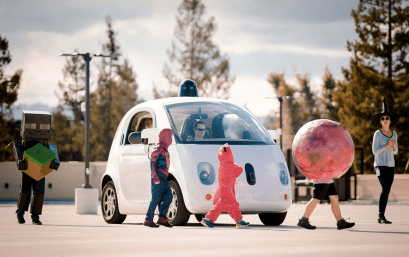
Apparently, Halloween was a big help:
Screen Shot 2015-11-02 at 12.26.57 PM
Halloween’s a great time to get some extra learning done. This week, lots of little ghouls, superheroes and even robots were running around Google with their families, so we asked them to hang out around our parked cars. This gives our sensors and software extra practice at recognizing children in all their unique shapes and sizes, even when they’re in odd costumes.
We teach our cars to drive more cautiously around children. When our sensors detect children—costumed or not—in the vicinity, our software understands that they may behave differently. Children’s movements can be more unpredictable—suddenly darting across the road or running down a sidewalk—and they’re easily obscured behind parked cars. So even if our cars can’t quite appreciate the effort the kids put in dressing as their favorite character from Frozen, they’re still paying full attention!
An update on how many miles driven and where were reported again as well:
– 23 Lexus RX450h SUVs – currently self-driving on public streets; 19 in Mountain View, CA, 4 in Austin, TX
– 25 prototypes – currently self-driving on public streets; 21 in Mountain View, CA & 4 in Austin, TX
Miles driven since start of project in 2009
“Autonomous mode” means the software is driving the vehicle, and test drivers are not touching the manual
controls. “Manual mode” means the test drivers are driving the car.
– Autonomous mode: 1,268,108 miles
– Manual mode: 938,621 miles
– We’re currently averaging 10,000-15,000 autonomous miles per week on public streets
The reports are quite fascinating and give us a peek into just how involved this futuristic, but attainable, project is. The company discussed how to keep “drivers” engaged while the car drives itself, which is an industry-wide concern. The company discussed folks in the car reaching into their bags in the bag seat for their phones, something which scares the crap out of me regardless of how accurate the self-driving car is. The message? People trust the cars. I mean, at least the volunteers they had out testing them did. They were all Google employees, because duh.
None of this is a slam dunk because hey…some people enjoy driving. Google discusses how this technology is great for commuting, which is agreeably boring ass driving. We’ll keep reading the reports while you keep paying attention to the road.

Comments

Popular posts from this blog

Top 20 WordPress Interview Questions and Answers

Top 40 WordPress Interview Questions and Answers  for freshers and experienced are below are below : 1. What is WordPress? WordPress is an online, open source website creation tool written in PHP. But in non-geek speak, it's probably the easiest and most powerful blogging and website content management system (or CMS) in existence today. 2. Different between WordPress.com vs WordPress.org? WordPress.com (fully hosted) Focus on your beautiful content, and let us handle the rest. WordPress.org (self-hosted) Get your hands dirty, and host your website yourself. refer official URL: https://en.support.wordpress.com/com-vs-org/ for more details. 3. Use of WordPress? WordPress is a free and open-source blogging tool and a content management system (CMS) based on PHP and MySQL. Features include a plugin architecture and a template system. WordPress was used by more than 23.3% of the top 10 million websites as of January 2015 4. feature of WordPress? Here are some of the featu...

How Education Will Be Smarter, Less Intrusive, And Able To Respond To How You Feel

Impatience characterizes the technology sector’s approach to education. Disruption is taking place in all other sectors of society — so, why not education? I know too well, whether at Pearson or in the classroom, the challenges and frustration of developing and using digital tools that improve outcomes for students. But I’m optimistic. We are on the verge of a tide of smarter innovation that, if allowed to spread, will turbocharge the learning experience for students. Here are four areas worth watching: 1. Using technology to learn from learners Every great digital product constantly evolves by learning from its users, adding capabilities, and improving its performance. If it’s true for your Facebook feed, then why not education? The potential is there, as the OECD’s recent report on  Students, Computers and Learning  (OECD) incidentally showed how clickstream and tracking navigation in digital readers can be used to see how students process online text and...

IT Where

#Responsive_Webdesign  start from #7500, #hosting_Service  Start from #3300 Per Year #get   #your   #special  offers at  Itwhere Pondy #Digital_Marketing  , #SEO , #Product_Branding  at Itwhere Pondy Email:info@itwheretech.co. in M:+91 9092734853 www.itwheretech.co.in

Phoenix OS is (another) Android-as-a-desktop

Google Android may have been developed as a smartphone operating system (and later ported to tablets, TVs, watches, and other platforms), but over the past few years we’ve seen a number of attempts to turn it into a desktop operating system. One of the most successful has been  Remix OS , which gives Android a taskbar, start menu, and an excellent window management system. The Remix OS team has also generated a lot of buzz over the past year, and this week the operating system gained a lot of new alpha testers thanks to a  downloadable version of Remix OS  that you can run on many recent desktop or notebook computers. But Remix OS isn’t the only game in town.  Phoenix OS  is another Android-as-desktop operating system, and while it’s still pretty rough around the edges, there are a few features that could make it a better option for some testers. Some background I first discovered Phoenix OS from  a post in the Remix OS Google Group , altho...

Google Announces Android Wear Update With WiFi Support, Always-On Apps, And More

It has been a while since Android Wear got any substantial updates, but today Google is announcing a big one. A new version of Wear will be rolling out over the coming weeks that includes a number of previously rumored features (like WiFi support) and some all new stuff (like always-on apps). Most Wear devices use the always-on ambient mode for the watch face by default, the Moto 360 being a notable exception. The new Android Wear version allows apps to operate in ambient mode too, so they remain active when the watch goes to sleep. That makes it easier to take a quick glance at the app instead of waking the device up and opening the app all over again. The watch will still only go into full-color mode when necessary. WiFi support is also coming in the update, which means your watch can be useful even if your phone isn't connected. Watches with WiFi support will be able to connect to WiFi and still get messages and notifications from your phone, provided it has an interne...