
Facebook Rolls Out Support For 3D Touch, Offering Shortcuts For Posting Statuses, Photos And Videos On New iPhones

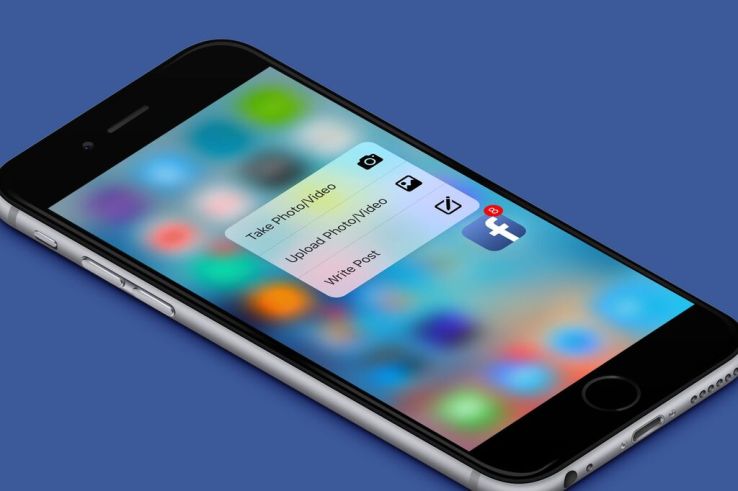
An update to Facebook’s iOS application, which rolled out earlier this morning, now allows iPhone 6s and 6s Plus owners running the latest version of Apple’s mobile operating system to take advantage of the newly introduced 3D Touch feature to more quickly interact with the social network. Following the update, a hard press on the Facebook’s app icon will offer you a handful of shortcuts, including the ability to take or upload photos and videos or the ability to write your status update.
The addition is one of the more highly anticipated rollouts of third-party support for 3D Touch, a new user interaction that’s something of a spinoff of the similar Force Touch option on Apple Watch. A flagship feature on the new iPhones, 3D Touch is another gesture you can use with your device for faster access to apps.
It’s been likened by some as a right click for apps, as it’s a shortcut to things you can do within a mobile application, but also something of an optional step for power users rather than a new interaction everyone has to learn.
Initially, the 3D Touch option was available with a number of Apple’s default applications, like Mail, Music and Maps, for example, but has been steadily rolling out to third-party applications following the iPhone 6s and 6s Plus’s launch. Facebook-owned Instagram was among the first to offer 3D Touch support, but Facebook’s support means the feature now reaches one of the top mobile apps of all time – and one that reaches more of the app audience than any other, according to comScore.
Facebook’s other apps, including WhatsApp, Messenger, Moments, Groups and others, have yet to support the new interaction.
In addition to Facebook, other top apps now supporting 3D Touch include Pinterest, Jet, Twitter, Shazam, OpenTable, chat apps like Confide and FireChat, Medium, Dropbox, Evernote, and more.

The updated Facebook app is now live on iTunes. It doesn’t appear that Facebook has gained any other iPhone 6s or 6s Plus-only features in the new update, such as support for Live Photos, though that’ssomething in the works for later this year, Apple has said.Of course, users would never know that Facebook had rolled out 3D Touch today because of Facebook’s refusal to offer detailed app release notes – a plague in the industry, where developers no longer feel it’s necessary to inform users of the changes arriving in new versions of their applications.

Comments

Popular posts from this blog

How Education Will Be Smarter, Less Intrusive, And Able To Respond To How You Feel

Impatience characterizes the technology sector’s approach to education. Disruption is taking place in all other sectors of society — so, why not education? I know too well, whether at Pearson or in the classroom, the challenges and frustration of developing and using digital tools that improve outcomes for students. But I’m optimistic. We are on the verge of a tide of smarter innovation that, if allowed to spread, will turbocharge the learning experience for students. Here are four areas worth watching: 1. Using technology to learn from learners Every great digital product constantly evolves by learning from its users, adding capabilities, and improving its performance. If it’s true for your Facebook feed, then why not education? The potential is there, as the OECD’s recent report on  Students, Computers and Learning  (OECD) incidentally showed how clickstream and tracking navigation in digital readers can be used to see how students process online text and...

Top 20 WordPress Interview Questions and Answers

Top 40 WordPress Interview Questions and Answers  for freshers and experienced are below are below : 1. What is WordPress? WordPress is an online, open source website creation tool written in PHP. But in non-geek speak, it's probably the easiest and most powerful blogging and website content management system (or CMS) in existence today. 2. Different between WordPress.com vs WordPress.org? WordPress.com (fully hosted) Focus on your beautiful content, and let us handle the rest. WordPress.org (self-hosted) Get your hands dirty, and host your website yourself. refer official URL: https://en.support.wordpress.com/com-vs-org/ for more details. 3. Use of WordPress? WordPress is a free and open-source blogging tool and a content management system (CMS) based on PHP and MySQL. Features include a plugin architecture and a template system. WordPress was used by more than 23.3% of the top 10 million websites as of January 2015 4. feature of WordPress? Here are some of the featu...

Google Announces Android Wear Update With WiFi Support, Always-On Apps, And More

It has been a while since Android Wear got any substantial updates, but today Google is announcing a big one. A new version of Wear will be rolling out over the coming weeks that includes a number of previously rumored features (like WiFi support) and some all new stuff (like always-on apps). Most Wear devices use the always-on ambient mode for the watch face by default, the Moto 360 being a notable exception. The new Android Wear version allows apps to operate in ambient mode too, so they remain active when the watch goes to sleep. That makes it easier to take a quick glance at the app instead of waking the device up and opening the app all over again. The watch will still only go into full-color mode when necessary. WiFi support is also coming in the update, which means your watch can be useful even if your phone isn't connected. Watches with WiFi support will be able to connect to WiFi and still get messages and notifications from your phone, provided it has an interne...

IT Where

#Responsive_Webdesign  start from #7500, #hosting_Service  Start from #3300 Per Year #get   #your   #special  offers at  Itwhere Pondy #Digital_Marketing  , #SEO , #Product_Branding  at Itwhere Pondy Email:info@itwheretech.co. in M:+91 9092734853 www.itwheretech.co.in

The Eight Most Impactful Excel Shortcuts That You Should Master

If you’ve ever gone online to research improving your Excel skills, you’ve undoubtedly come across a post or two listing all of Excel’s keyboard shortcuts.  In the latest version of Excel, Microsoft has made it easier than ever to learn shortcuts, by assigning shortcuts to nearly every function and making the discovery of the input sequence very transparent. While memorizing Excel shortcuts will generally improve your productivity, not all shortcuts are created equal.  Shortcuts that you never use are not inherently not very useful and not worth memorizing.  Your focus should be on the shortcuts that have the most impact – either by the amount of time it saves you, the frequency that you’ll use them, or the behavior it encourages. If you’ve already started using Excel or just haven’t utilized shortcuts heavily before, review the top eight shortcuts below.  For any that you don’t know already, I would suggest memorizing them and incorp...