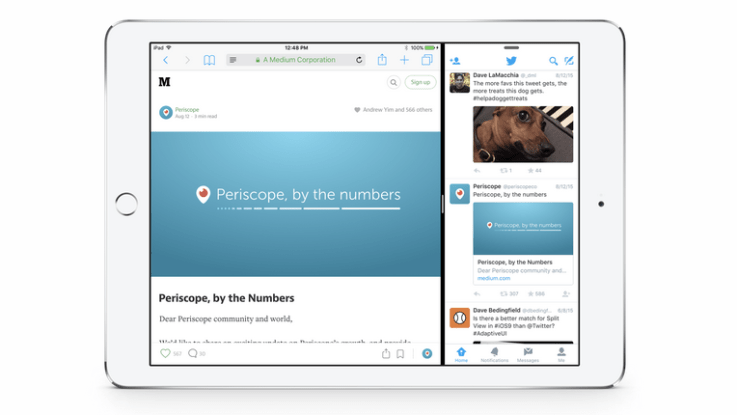
Twitter Unifies Its iOS App Design And Development


RIP designed for iPad? Twitter has unified the design and development of its iOS apps, switching from developing and designing each app separately, off of a shared code base, to using responsive web design to handle the various different screen sizes without having to pour in as much engineering resource.
Twitter is calling its new responsive iOS framework “adaptive UI”, and says it’s currently rolling it out to its iOS apps. The move follows Apple adopting a responsiveness framework in iOS 8 with size classes.
Cupertino has of course been introducing more screen sizes to its iOS device portfolio in recent years, with a spectrum of screen sizes now in play, from legacy sub-4 inches iPhones still in use by consumers, right up to 9.7 inch iPads (and rumors of an even larger iPad Pro slated to be unboxed at the Apple event later today), making adaptive design more appropriate.
Writing about the change to its iOS apps in a blog post yesterday, Twitter noted: “Previously, Twitter for iPhone and iPad offered very different experiences. Now, Twitter apps on these devices will be more consistent regardless of which one you’re using. Starting today, iPad users will be able to create and see revamped quote Tweets, explore trending topics in search, visit product and place pages, and more.”
Consistency also = control. So the move arguably helps Twitter address and make the most of its never-large-enough-for-the-investors user-base, regardless of which iOS device they happen to be using its Twitter client on. (While it has of course been discouraging use of third party Twitter clients for years — although some do persist.)
Twitter’s own spin on the shift is that the adaptive approach will allow it to support new iOS features more quickly. It sums up its new iOS philosophy as “a way of thinking about environment rather than device, and designing for all possible environments”.
It writes:
Now, we have new tools that are more robust and allow faster iteration. Adaptive UI gives us the ability to support new devices and bring new Twitter features to people faster… Ultimately, it’s no longer Twitter for iPhone and Twitter for iPad: it’s Twitter for iOS, and it will now be optimized for different contexts. That’s a freedom which helps us to make Twitter the best experience it can be for everyone, regardless of device.
That said, it’s not going to be a ‘seamlessly consistent’ experience between iPhone and iPad Twitter apps from here on in. Twitter caveats the above point by noting that “from time to time” there will be “some differences in features and functionality between devices” — although it adds that its future aim is to achieve “complete feature parity” across iPad and iPhone.

Comments

Popular posts from this blog

The EHang 184 Is A Human-Sized Drone Taking Off At CES

We’ve seen some pretty cool stuff on day 1 of CES 2016, but probably nothing more eye-catching than the EHang 184, a human-sized drone built by the Chinese UAV company  EHang . Yes you heard right — a giant autonomous drone that fits a human. It’s basically what you would expect to see if someone shrunk you down to the size of a LEGO and stuck you next to a DJI Inspire. Except no one was shrunk, and the giant flying machine was sitting smack in the middle of the CES drone section. EHang, which was founded in 2014 and has raised about $50M in venture fundingto date, was pretty gung-ho about telling everyone at CES that the 184 was the future of personal transport. And for the most part, people were too in awe to question them. But the reality is that the company probably was using the 184 as more of a marketing tool for their standard-sized drones like the  Ghost . Not that we’re saying that the 184 will never be a real thing, just that it probably isn’t co...

Western Union Brings Money Transfer And Its Tricky Fees To Chat Apps

Remittance has always been a shady business. Migrant workers need to send money they earn home to their families, but get hit with fine print fees so less cash comes out the other side than they might assume. Remittance companies earn extra by keeping the margin between their own made up exchange rate and the real one. Western Union is the best known remittance company, with 500,000 brick-and-mortar locations around the world. But tech startups like TransferWise, Azimo, and WorldRemit are gunning for the business. They hope to increase convenience and reduce fees to lure customers away from Western Union, Moneygram, and other old-school remittance providers. So  Western Union  is going digital thanks to partnerships with big messaging apps. It launched its Western Union Connect system in October last year, followed by a partnership with WeChat for sending up to $100. Now it’s getting into bed with  Viber , which has over 664 million “unique” users, thou...

Android Oreo vs iOS 11: What’s different and what’s the same?

Google just announced Android Oreo and it packs a handful of new features. Some are at the system level and speed up the system and extend the battery life, while others are features that will change the way users interact with their phone. A lot of these features should be familiar to iPhone and iPad owners. Normally Apple is the one accused of copying Android, but for Android Oreo, Google lifted a handful of features straight from iOS, while a couple of new functions are hitting Android before iOS.                                                                                                                     Notifications Google cribbed iOS for Android’s new notification scheme. In An...

NVBOTS Wants To Make 3D Printers As Easy As Toasters

Right now 3D printing curriculums, if they exist, are fairly sparse. Putting a two thousand dollar machine in front of a grade schooler usually ends up in a lot of 3D printed Yoda heads and not much education while the learning curve for most 3D design tools is steep. That’s what the founders of NVBOTS, AJ Perez, Forrest Pieper, Christopher Haid, and Mateo Peña Doll, are looking to solve. Their product, the  NVPRO , is a 3D printer with a few interesting features. The two most interesting are the automatic removal system which pops parts off of the build plate when they are done and a built-in print server that allows you to print from any device. This means you can run large batches of prints from different users with each part popping off as its printed. This means a class of students can send jobs to a printer and then pick them up just as they would a laser printer. The printer also supports a central “admin” who can check jobs before they are printed as and offers a ...

Smart savings app Clinc is a new fintech startup from ex-CEO and founder of Numbrs

Last April, Julien Arnold quietly left his role as CEO of Numbrs, the mobile-first banking app he co-founded with Swiss company builder Centralway. Now, almost a year on, he’s on the verge of launching his next project:  Clinc , a mobile app to make it easier to save money for a future purchase or financial rainy day. Using what Arnold describes as a “dynamic intelligence algorithm,” Clinc promises to track your current account spending and analyse the results to find the optimum amount to save each month, which is then automatically deposited into your Clinc savings account underpinned by the startup’s partner bank. The secret sauce, which he won’t go much into detail on, is that the app is dynamic, able to make on-the-fly adjustments to how much you transfer to your savings account based on how your spending has changed or are predicted to change. In other words, Clinc’s central proposition is to help you achieve your financial goals faster. “This is the bigges...